AI Tool
Cursor
AI-first code editor
By Maali K · Software Engineer & AI Tools Reviewer
Last reviewed January 28, 2026 · How we review
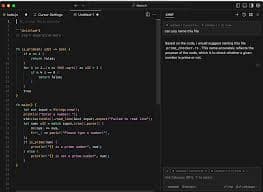
A coding-focused editor with AI assistance for refactors, understanding codebases, and faster iteration.
Our verdict
Cursor
Cursor is the first AI coding tool that meaningfully changed how I write software. The agent-style edits, codebase-wide context, and ability to run multi-file refactors in natural language are genuinely faster than doing it by hand. If you write code daily, the $20/month pays back within a week.
Best for
Quick ways people use Cursor to get value.
AI-assisted coding inside an editor
Refactoring and codebase navigation
Debugging with context of your project
Fast iteration on features and fixes
Who should use Cursor
You write code daily and want AI that understands your whole project, not just one file.
You do refactors, migrations, or multi-file changes regularly.
You want to pick models (Claude, GPT, others) based on the task.
Who should skip
You need autocomplete and nothing else — Copilot is simpler and cheaper.
You can't send code to third-party model providers (security-regulated work).
Best for roles
- Engineer
Use-cases
- Coding help
- Refactors
- Codebase understanding
How people use it
Real workflows you can copy.
Bug → fix → test
- 1
Paste error and describe expected behavior.
- 2
Ask for likely causes and how to confirm.
- 3
Generate fix + minimal test.
- 4
Refactor for readability and add guardrails.
Example prompts
Copy/paste to try immediately.
Explain this error and give 3 fix options: [error/context]
Refactor this file for readability and performance: [code]
Generate tests for this function and edge cases: [code]
Pros
- Great for daily dev work
Cons
- Best value if you code a lot
Cursor vs. the alternatives
Detailed head-to-head breakdowns, each with pricing, strengths and a recommendation.
Frequently asked questions
Common questions about Cursor.
Is Cursor better than GitHub Copilot?+
What's included in the free tier?+
Does Cursor work with my IDE?+
Related pages
Explore more pages connected to Cursor.
Use-cases